The dCache project at Brookhaven Lab provides an open-source storage software solution and is a joint venture involving Deutsches Elektronen-Synchrotron (DESY), Fermi National Accelerator Laboratory (FNAL), and the Nordic e-Infrastructure collaboration (NeIC).
dCache aggregates multiple storage types (disk or tape, e.g., Mass Storage System/BNL HPSS system) into a single storage system and manages data movement, replication, and integrity. dCache supports several access protocols, including https or posix.
The SDCC has a site license for Insure++ from Parasoft. This package is used to find runtime errors in C++ code - detect memory problems, runtime errors, and security vulnerabilities such as memory corruption, memory leaks, buffer overflow/underflow, and stack overruns.
The application can be found at the SDCC at:
HPC Jupyter Kernels
To create a custom Jupyter kernel from jupyter.sdcc.bnl.gov for the HPC, You need terminal shell access. You can use ssh login to ic2submit01/02 via ssh gateway. Or just start a terminal from Jupyter session.
The following command will create a Jupyter kernel which will be based on any python environment your terminal session is in, whether it's some base python distribution environment or an activated python virtual env.
The portal is accessed through a load-balancing web proxy located at https://jupyter.sdcc.bnl.gov/. The proxy offers redirection to multiple entry points depending on the resources required. Currently, there are two types of entry points:
Once a Jupyter session starts up, users will be presented with a Jupyterlab interface that appears as follows:
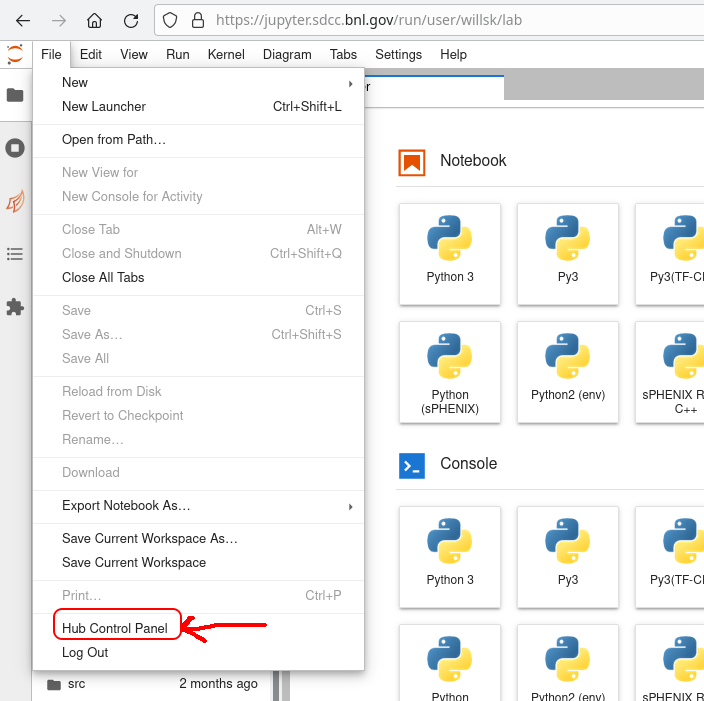
In order to log out of a "local" session, simply select the "Hub" pulldown menu and "Logout":
In order to use/access the SDCC resources, you will need a valid allocation.
To have a valid allocation you need to fulfill one of the following:
- Access to an allocation of computational or storage resources as a member of a project account
- Commercial allocation by contacting CSI
Once approved, upload your public SSH key to the facility via this form.
See also:
Two-factor authentication for webmail
Two-factor authentication is forced for all external-facing email by DOE from April 15th 2020.
1. Navigate to the webmail interface: https://webmail.rhic.bnl.gov. Check "Activate" to activate two-factor authentication.
2. Click on "Create Secret" to randomly generate a secret.