User account menu

  • Log in
Home

Scientific Computing and Data Facilities

Main Navigation (Pathauto)

  • Information
    • Getting Started
    • Federated Identity Management (COmanage)
    • Grid Users
    • High Performance Computing
    • High Throughput Computing
    • Monitoring
    • SCDF Password Policy
    • SSH
    • About the SCDF
    • Related Links
  • Services
    • Storage Services
    • Development Environments
    • Jupyter
    • Document Repositories
    • Data Transfer Tools
    • Ticketing/Project Tracking
    • CVMFS
    • NoMachine/NX
    • Email Services
    • AFS Distributed File System Service
    • Mattermost Chat Service
  • Experiments
    • Belle II
    • Center for Functional Nanomaterials
    • DUNE
    • PHENIX Experiment
    • sPHENIX
    • STAR Experiment
    • US-ATLAS
    • USQCD
  • News & Events
    • Recent Announcements
    • BNL Public Mailing Lists
  • Help
    • Reporting Problems

Site Search

Breadcrumb

  • Home
  • Site Search

HPSS at the SDCC

Information about the HPSS data storage service

  • HPSS archiving tools - native HPSS archive tools that are available to SDCC users

HPSS Archiving Tools

RHIC and LSST users can put data into HPSS using one of the following native HPSS archive client tools. (US Atlas users should use dCache to put data into HPSS.)  HSI & HATR outlined below require a valid Kerberos TGT for authentication purposes.

Using BNLBox Cloud Storage


VOMS Admin Management

New requests for VO membership should be verified for existing CERN accounts, and prevented from creating duplicate memberships, before approval.

This procedure is intended only for VO administrators. It may be useful to open multiple browser windows for each of the necessary sites (VOMS Admin, CERN Accounts, etc.).

Globus File Transfer

File transfers — Globus online

Globus provides a secure, unified interface to your research data. Use Globus to 'fire and forget' high-performance data transfers between systems within and across organizations.

Creating a Community


  • Zenodo provides the capability of associating records to topic centric Communities. 

    Any authorized user (capable of log in) can create a Community, by doing so, it becomes the Community’s curator

    The curator will decided what records are allowed to be associated to the curator’s community

Using BNLBox from the Command Line


Git Services


  The SDCC provides Git services for use by experiments.

Log into the BNL ZENODO Repository


  • Accessing the EIC-Zenodo repository

    The following example is done for the EIC Zenodo but it applies for the covid-19-archive repository 

    EIC Zenodo repository is integrated with COmanage to enable your institutional account be used to login into the instance.

    To login into the EIC Zenodo instance you need to be part of the COmanage EIC-Zenodo group.

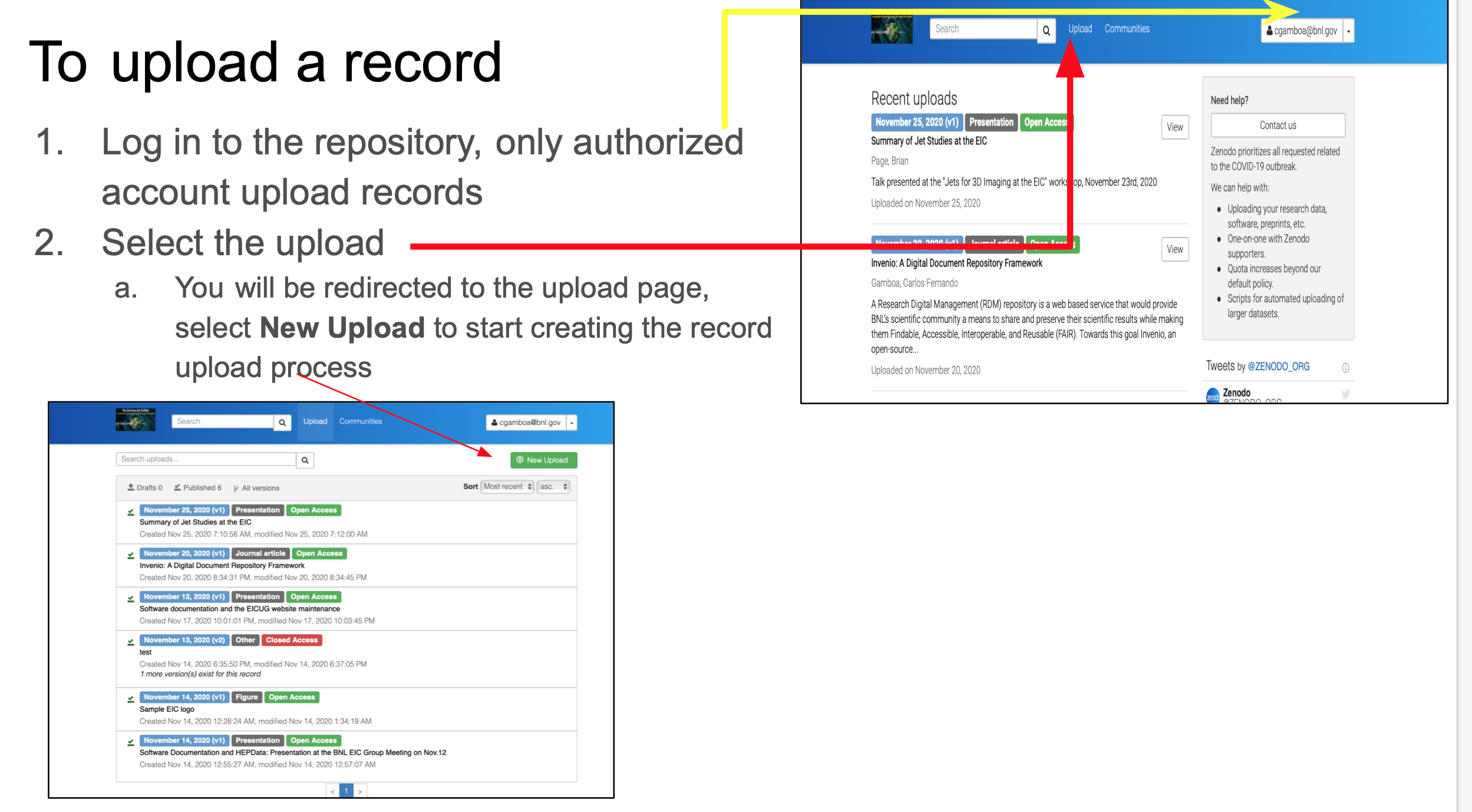
Uploading a Record to Zenodo


upload-record-to-zenodo


Pagination

  • Previous page ‹‹
  • Page 63
  • Next page ››

News & Announcements

Power Incident at the BNL Data Center
Issue with RT notification in User Accounts queue
RHIC AFS migration to OpenShift
NX Campus System Update
Mattermost Emergency Downtime
Mattermost Update
RACF Gitea Maintenance
Unplanned power outage on Friday, May 2nd
RACF Gitea Upgrade

Footer Menu (Pathauto)

  • Getting Started
  • Facility Services
  • Experiments
  • News & Events
  • About SCDF
  • Help

Copyright © 2026 Brookhaven National Laboratory. All rights reserved.