User account menu

  • Log in
Home

Scientific Computing and Data Facilities

Main Navigation (Pathauto)

  • Information
    • Getting Started
    • Federated Identity Management (COmanage)
    • Grid Users
    • High Performance Computing
    • High Throughput Computing
    • Monitoring
    • SCDF Password Policy
    • SSH
    • About the SCDF
    • Related Links
  • Services
    • Storage Services
    • Development Environments
    • Jupyter
    • Document Repositories
    • Data Transfer Tools
    • Ticketing/Project Tracking
    • CVMFS
    • NoMachine/NX
    • Email Services
    • AFS Distributed File System Service
    • Mattermost Chat Service
  • Experiments
    • Belle II
    • Center for Functional Nanomaterials
    • DUNE
    • PHENIX Experiment
    • sPHENIX
    • STAR Experiment
    • US-ATLAS
    • USQCD
  • News & Events
    • Recent Announcements
    • BNL Public Mailing Lists
  • Help
    • Reporting Problems

Site Search

Breadcrumb

  • Home
  • Site Search

RT System Quick Start Guide

What is RT?

RT, or Request Tracking, is the system used by the SCDF to track user requests and problem reports. You can open a new ticket, or follow up on an existing ticket, via email or through the Web interface, as both interfaces interact with and update a single RT system.

Getting Started with RT: Creating a Ticket

Determine the appropriate RT queue

CRS Design Documents

Plans and flowchart used during the design stage of the new CRS software

CRS Flowchart

CRS Plans

Logout

Due to inactivity, you have been logged out. Please log in again to continue.

Virtual Organization Membership Service

Virtual Organization Membership Service (VOMS) service, user, and administrator (Admin) information.

VOMS Group Managers

There is now a new GroupManager role available for the VO. This role is used like the VO-Admin role was previously in VOMRS, so as to internally to tag the group managers.

For each group to which we want to delegate management, we need to add an ACL for both the group and the VO root. The ACLs can be granted via the this link:

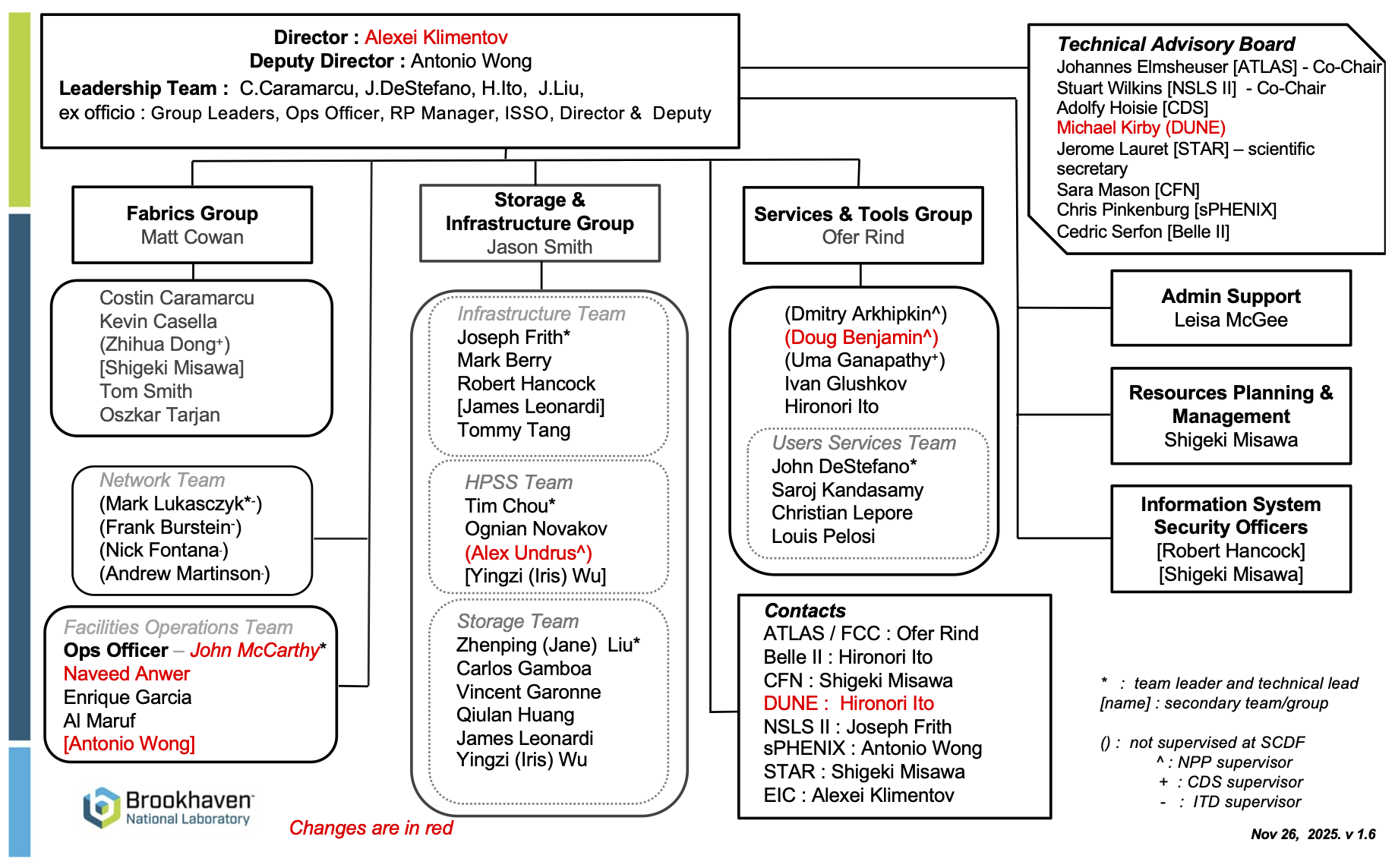
SCDF Organizational Chart

SCDF Organizational Chart, November 26, 2025


SCDF Password Policy

Changes to facility password policies and tools.

To reinforce the SDCC facility Cyber Security posture and reduce the risk of future compromises, the SDCC/RACF password policy has been designed to comply with current best practices as specified in NIST's Digital Identity Guidelines for Authentication (NIST800-63B).

Users may employ the web interface for changing passwords. Your current SDCC/RACF username and password are required for access.

US ATLAS Tier 3

  • Computing and Batch Systems - logging into our computing farm and running HTCondor jobs
  • List of users and institutes - maps users to the groups in HTCondor they should submit to
  • General information about the BNL shared Tier-3 - B

Computing and Batch Systems

  • Quickstart for current T3 users - information on what to change for users who use the current Tier-3 pool
  • Using HTCondor batch - information for Tier-3 batch

Quick Start for Current T3 Users

Condor Job Description Changes

Your jobs will be automatically classified into a group based on your institution membership. Check this page for a list of known users and their institutes.

If you see a warning about being in a "general" group, or if running the whatgroup command does not return a group, please submit a help ticket to our USAtlasSharedT3 queue to request membership.

All other directives (RACF_Group, Job_Type, etc...) will be ignored.

Pagination

  • Previous page ‹‹
  • Page 73
  • Next page ››

News & Announcements

Power Incident at the BNL Data Center
Issue with RT notification in User Accounts queue
RHIC AFS migration to OpenShift
NX Campus System Update
Mattermost Emergency Downtime
Mattermost Update
RACF Gitea Maintenance
Unplanned power outage on Friday, May 2nd
RACF Gitea Upgrade

Footer Menu (Pathauto)

  • Getting Started
  • Facility Services
  • Experiments
  • News & Events
  • About SCDF
  • Help

Copyright © 2026 Brookhaven National Laboratory. All rights reserved.