Last Updated on Thursday, July 26, 2001 at 13:29:05. by Author: Pradeep Sarin
(Expert)
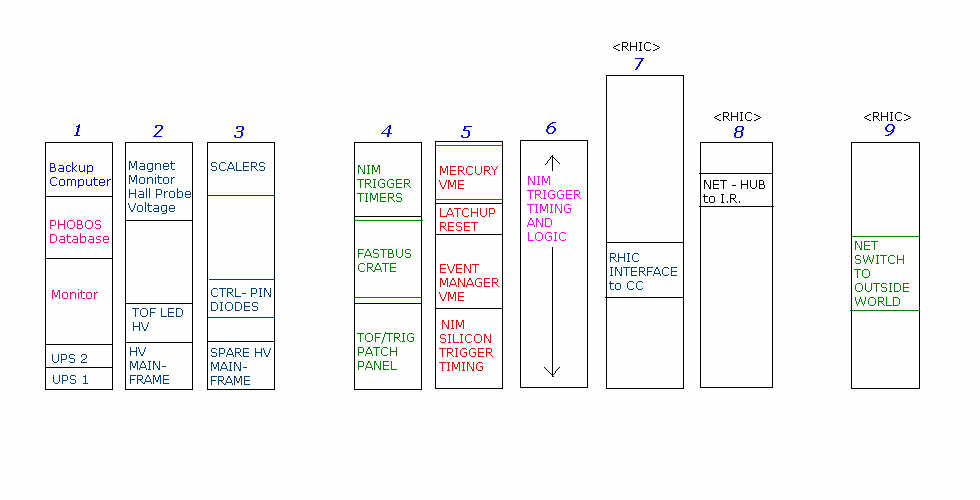
The VME Crate containing the Mercury System Boards is located in the Electronics Room
at the top of Rack 5:
When the crate is reset, (either by cycling the power or by pressing the RST button on the left-most, crate-controller module), the Mercury proccessors boot-up and automatically load the programs necessary for DAQ operations. The Mercury crate is connected by a point-to-point network connection to the Event-builder (phobosx) computer which provides a local IP address and name (silicon) for the crate. So the crate is 'visible' only from phobosx computer - you can do a password-less login from phobosx using 'telnet silicon'. After a normal boot-up sequence, you should be able to login to the crate-controller and the Mercury DAQ programs should be printing a message 'Waiting for Registration with PhatDAQ..' From there follow normal DAQ procedures.
For those interested, the (heavily documented!) code that runs on the Mercury system is
placed under CVS and is accessible at :
http://www.rhic.bnl.gov/~phobos/cgi-bin/cvsweb.cgi/MercuryZSS.
Currently the Mercury and VxWorks cross-compilers needed to compile this code and make it
run on the Mercury processors are setup on phobosun.chm.bnl.gov (login:phobos). The
produced targets need to be placed in mercury@phobosx.chm.bnl.gov:~/zss
as this is the default directory the Mercury Crate looks into on boot-up to download the
programs. The Makefiles take care of this transferring, so to do a fresh build, all you
need to do is :
This should compile the programs needed and place them in mercury@phobosx.chm.bnl.gov:~/zss
Please send all comments and suggestions regarding this page to Pradeep. |