Last Updated on
Thursday, February 03, 2005 at
09:33:14. by Author: Iouri Sedykh
|
!!! DON'T EXECUTE !!!
|
| Not approved officially! |
Emergency Shut Down Procedure
- Go to SiMon screen
- If the Emergency Stop window is not seen
- If the task bar is not seen
- move the mouse cursor right at the bottom of
the screen
- the auto hidden task bar will appear
- Locate the Emergency_Stop.vi window icon
- Double click on it to open the window
- The Emergency Stop window looks like
that
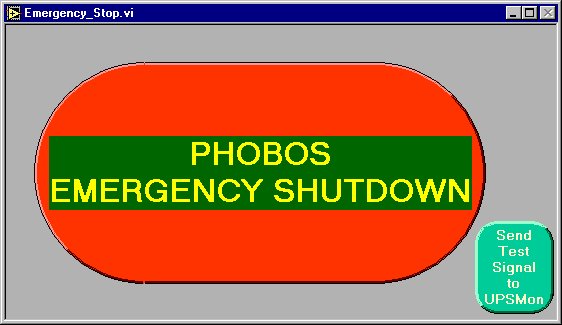
- Click on the big red button
- The confirmation window will appear twice, "Shutdown" must be
clicked both times (or "Cancel" if you change your
mind).
Attention! For the safety reason the "Shutdown" button will be on the
left hand at the first confirmation and on the right hand at the second
one.
Warning! In fact, after the second confirmation nothing can be done to prevent
the shut down.
- When shutdown starts
- The Silicon ramp down window will appear (for about 30 seconds).
- UPS's in the tunnel will be switched off, all of them (in about 2
seconds).
- UPS's in CH will be gracefully shut down (in about 5 minutes allowing
computers to shut down too).
- If not called yet, call and inform
- Robert Pak
- Project leader
- Iouri Sedykh
- System responsibles
A few details (for experts)
Some details about what happens when the emergency shutdown is initiated may be found here.