Last Updated on Tuesday, August 19, 2014 at 15:47:47. by Author: Iouri Sedykh
UPSMon monitors and controls the UPS's used in the CH and in the tunnel. The UPSMon computer has no display and physically is underneath the DAQ X-term.
UPSMon monitoring starts automatically during start up of the system. So, the easiest way to start UPSMon is just to reboot the computer. For experts who know the root password of UPSMon it is enough to enter the command "/etc/init.d/upsmon restart". UPSMon is accessible from chemistry network and from any of RSSH.RHIC.BNL.GOV nodes.
UPSMon is reading (via SNMP protocol) parameters of UPS's and catches the traps (messages about various events: "go to batteries", "self test", many others) sent by UPS's. The parameters and trap messages are written to the PHOBOS DB. The last parameter values and trap messages for last 24 hours may be seen at the Portal UPS page (http://www.bnl.gov/phobos/Detectors/ASP/SlowControl/UPS_Status_Portal.asp). There is a set of alarm conditions which cause UPSMon to send the alarm to the alarm server. Usually the problematic UPS is highlighted with red or yellow color at the WWW page. In practice the alarm signal is generated in a few seconds after the problem appeared, on the WWW page the corresponding change may appear in a few minutes (in the DB it appears at the same time with the alarm but changes are reflected at Portal page much later). So, be patient!
All events (loss of connection with any UPS, alarm conditions, etc.) are written to the logfile. Every start of UPSMon opens individual logfile. They may be found in the directory /home/ysedykh/UPS/log. The traps are written in the same way in the same directory.
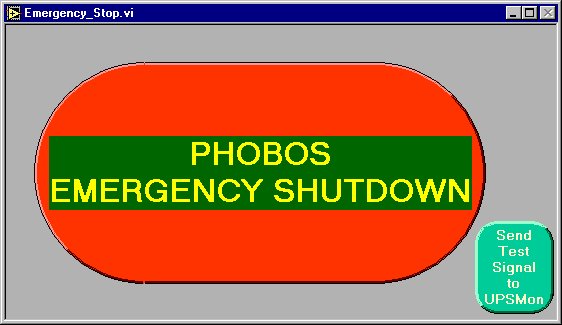
Emergency master kill button is on the "Emergency Stop" window of the SiMon monitoring program.
When the button is pressed and the action is confirmed SiMon sends the message to UPSMon which processes the message in correspondence with configuration (which UPS's must be switched off, switched off gracefully and in which order). The connection between SiMon and UPSMon may be tested at any time pressing the green button on the "Emergency Stop" window of SiMon. The response may be "OK" or "Failure" (wait for it, it may take a few seconds). In addition SiMon regularly sends heartbeat signals to UPSMon. First 5 heartbeat and all other signals (including the test one) are reflected in the UPSMon logfile. All shutdown actions are reflected in the logfile too.
In a case of problems, contact Iouri Sedykh.