Release 8.0.4 for Windows NT and Windows 95
A55922-01
 Library |
 Product |
 Contents |
 Index |
| Oracle8 Client Getting Started Release 8.0.4 for Windows NT and Windows 95 A55922-01 |
|


This chapter describes Windows NT-specific issues for application developers.
Specific topics discussed are:
The XA Application Program Interface (API) is typically used to enable an Oracle8 database to interact with a transaction processing (TP) monitor, such as:
The Oracle XA Library is automatically installed as part of Oracle8 Enterprise Edition. The following components are created in your Oracle home directory:
| Component | Location |
|---|---|
|
XA80.DLL |
ORACLE_HOME\BIN |
|
XA80.LIB |
ORACLE_HOME\RDBMS80\XA |
|
XA.H |
ORACLE_HOME\RDBMS80\XA |
You can also use TP monitor statements in your client programs. The use of the XA API is also supported from both Pro*C and Oracle Call Interface (OCI). In either case, the XA80.DLL must be contained in the execution path of the calling program.
To compile and link a Pro*C program:
| Library | Located in... |
|---|---|
|
XA80.LIB |
ORACLE_HOME\RDBMS80\XA |
|
OCI.LIB |
ORACLE_HOME\OCI80\LIB\MSVC |
|
|
or |
|
|
ORACLE_HOME\OCI80\LIB\BORLAND |
|
SQLLIB80.LIB |
ORACLE_HOME\PRO80\LIB\MSVC |
|
|
or |
|
|
ORACLE_HOME\PRO80\LIB\BORLAND |
To compile and link an OCI program:
| Library | Located in... |
|---|---|
|
XA80.LIB |
ORACLE_HOME\RDBMS80\XA |
|
OCI.LIB |
ORACLE_HOME\OCI80\LIB\MSVC |
|
|
or |
|
|
ORACLE_HOME\OCI80\LIB\BORLAND |
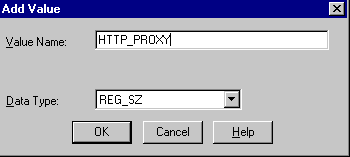
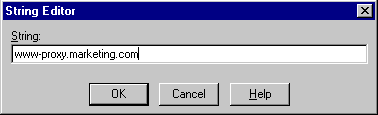
You must add a parameter to the registry before using ICX.
To configure ICX:
C:\> REGEDT32
The Registry Editor window appears.
ICX enables you to use a stored package called UTL_HTTP to make hypertext transfer protocol (HTTP) calls from PL/SQL, SQL, and Server Manager statements. UTL_HTTP can:
UTL_HTTP contains two similar entry points, known as packaged functions, that make HTTP callouts from PL/SQL and SQL statements:
Both packaged functions:
The declarations to use with both packaged functions are described in the following sections.
UTL_HTTP.REQUEST takes a URL as its argument and returns up to the first 2000 bytes of data retrieved from the given URL.
UTL_HTTP.REQUEST is specified as:
FUNCTION REQUEST (URL IN VARCHAR2) RETURN VARCHAR2;
To use UTL_HTTP.REQUEST from Server Manager, enter:
SVRMGR> SELECT UTL_HTTP.REQUEST('HTTP://WWW.ORACLE.COM/') FROM DUAL;
which outputs:
UTL_HTTP.REQUEST('HTTP://WWW.ORACLE.COM/')
------------------------------------------------------
	<html>
	<head><title>Oracle Corporation Home Page</title>
	<!--changed Jan. 16, 19
	1 row selected.
UTL_HTTP.REQUEST_PIECES takes a URL as its argument and returns a PL/SQL table of 2000 bytes of data retrieved from the given URL. The final element may be < 2000 characters. The UTL_HTTP.REQUEST_PIECES return type is a PL/SQL table of type UTL_HTTP.HTML_PIECES.
UTL_HTTP.REQUEST_PIECES, which uses type UTL_HTTP.HTML_PIECES, is specified as:
type html_pieces is table of varchar2(2000) index by binary_integer;
function request_pieces (url in varchar2,
	   max_pieces natural default 32767)
	return html_pieces;
A call to REQUEST_PIECES can look like the example below. Note the use of the PL/SQL table method COUNT to discover the number of pieces returned, which may be zero or more:
declare pieces utl_http.html_pieces;
begin
  pieces := utl_http.request_pieces('http://www.oracle.com/');
   for i in 1 .. pieces.count loop
     .... -- process each piece
   end loop;
end;
The second argument to UTL_HTTP.REQUEST_PIECES, (MAX_PIECES) is optional. MAX_PIECES is the maximum number of pieces (each 2000 characters in length, except for the last, which may be shorter) that UTL_HTTP.REQUEST_PIECES returns. If provided, that argument is likely a positive integer.
For example, the following block retrieves up to 100 pieces of data (each 2000 bytes, except perhaps the last) from the URL. The block prints the number of pieces retrieved and the total length, in bytes, of the data retrieved.
	set serveroutput on
	/
	declare
	  x utl_http.html_pieces;
	begin
	  x := utl_http.request_pieces('http://www.oracle.com/', 100);
	  dbms_output.put_line(x.count || ' pieces were retrieved.');
	  dbms_output.put_line('with total length ');
	  if x.count < 1
	  then dbms_output.put_line('0');
	  else dbms_output.put_line
		((2000 * (x.count - 1)) + length(x(x.count)));
	  end if;
	end;
	/
which outputs:
	Statement processed.
	4 pieces were retrieved.
	with total length
	7687
The elements of the PL/SQL table returned by UTL_HTTP.REQUEST_PIECES are successive pieces of data obtained from the HTTP request to that URL.
This section describes the exceptions that can be raised by packaged functions UTL_HTTP.REQUEST and UTL_HTTP.REQUEST_PIECES.
The PRAGMA RESTRICT_REFERENCES enables exceptions (errors) to be displayed:
create or replace package utl_http is
function request (url in varchar2) return varchar2;
pragma restrict_references (request, wnds, rnds, wnps, rnps);
The PRAGMA RESTRICT_REFERENCES enables exceptions (errors) to be displayed:
create or replace package utl_http is
type html_pieces is table of varchar2(2000) index by binary_integer;
function request_pieces (url in varchar2,
       			max_pieces natural default 32767)
	return html_pieces;
pragma restrict_references (request_pieces, wnds, rnds, wnps, rnps);
This table describes possible error messages that can display:
Do not expect UTL_HTTP.REQUEST or UTL_HTTP.REQUEST_PIECES to succeed in contacting a URL unless you can contact that URL by using a browser on the same computer (and with the same privileges, environment variables, etc.). If UTL_HTTP.REQUEST or UTL_HTTP.REQUEST_PIECES fails (that is, if it raises an exception or returns an HTML-formatted error message, yet you believe that the URL argument is correct), try contacting that same URL with a browser to verify network availability from your computer.