B
Configuration Parameters and the Registry
The registry stores Oracle configuration parameters. This
appendix describes only the configuration parameters that apply to Oracle8
Enterprise Edition.
Specific topics discussed are:
About Configuration
Parameters
Oracle8 Enterprise Edition uses configuration parameters
to locate files and specify runtime parameters common to all Oracle products.
When an Oracle program or application requires a translation for a particular
configuration variable, Oracle8 Enterprise Edition consults the associated
parameter. Oracle parameters are stored in the registry.
Registry
Overview
Oracle8 Enterprise Edition stores its configuration information
in a database (the registry) that is organized in a tree format. The tree
format consists of keys in the registry and parameter values for the keys.
Keys and parameter values can be viewed and modified in the Registry Editor.
Keys are folders that appear in the left pane of a
Registry Editor window. A key contains subkeys or parameters.
WARNING:
The Registry Editor allows you to view and modify registry
keys and parameter values. Normally, you do not need to do so, and in fact,
are liable to break your system if you make incorrect changes. Only advanced
users should use the registry!
|
Parameters in the Registry Editor appear as a string that
consists of three components:
-
name of the parameter
-
value class or type of entry
-
value itself
For example, parameter ORACLE_SID can have the following
entry in the registry:
ORACLE_SID:REG_EXPAND_SZ:ORCL
Value classes for Oracle8 Enterprise Edition parameters are:
-
string value with a REG_SZ, REG_EXPAND_SZ (for an
expandable string), or REG_MULTI_SZ (for multiple strings) prefix to identify
a parameter value entry as a data string
-
binary value with a REG_DWORD prefix to identify
a value entry as a DWORD (hexadecimal data) entry
Registry
Parameters
This section describes the following Oracle8 database registry
parameters. Other products, such as Oracle Enterprise Manager and the Oracle8
Cartridges, have additional keys and parameters not described in this appendix.
To modify the registry values described below, see "Modifying
a Registry Value" in this appendix.
Parameters
for Most Oracle Products
This section describes the following parameter types:
Parameters for most Oracle products are contained within
the HKEY_LOCAL_MACHINE\SOFTWARE\ORACLE subkey. The exact location of parameters
within this key depends on the number of Oracle home directories created
on your computer. For the first installation, two registry subkeys are
created for storing product and installation parameters. For all additional
installations, only one registry subkey is created for storing product
and installation parameters.
The following table describes this process:
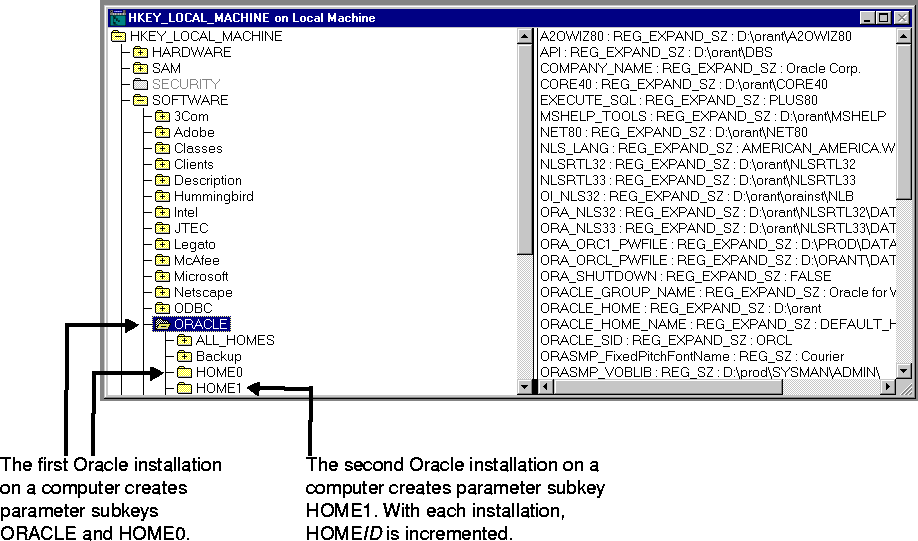
This figure shows the parameter subkeys created with two
Oracle home directories on the same computer:
Product
and Installation Parameters
This section lists the product and installation parameters
for most Oracle products. See the table in the previous section "Parameters
for Most Oracle Products" to identify the subkey under which these
parameters appear.
| Parameter |
Description |
Default
Value Entry |
|
A2OWIZ80 |
Specifies the location of Oracle Migration Assistant for
Microsoft Access files. |
ORACLE_HOME\A20WIZ80 |
|
API |
Specifies the location of files for Oracle Installer. |
ORACLE_HOME\DBS |
|
COMPANY_NAME |
Specifies the name of the company entered during the installation
process. |
company name entered during installation |
|
CORE40 |
Specifies the location of the database message files. |
ORACLE_HOME\CORE40 |
|
EXECUTE_SQL |
Specifies the executable to spawn SQL*Plus for the Oracle
Installer. |
PLUS40 |
|
ID |
Specifies the HOMEID of the Oracle home directory.
The first Oracle home is always specified as zero. |
0 |
|
MSHELP |
Specifies the location from where Windows help is invoked. |
ORACLE_HOME\MSHELP |
|
MSHELP_TOOLS |
Specifies the location of the Windows help files. |
ORACLE_HOME\MSHELP |
|
NET80 |
Specifies the location of the Net8 directory. |
ORACLE_HOME\NET80 |
|
NLS_LANG |
Specifies the supported language, territory, and character
set. This parameter specifies the language in which the messages are displayed,
the territory and its conventions for calculating week and day numbers,
and the character set displayed. The default value causes all messages
to be displayed in American English. |
AMERICAN_AMERICA. WE8ISO885981
|
|
NLSRTL32 |
Specifies the location of the Oracle7 NLS message files. |
ORACLE_HOME\NLSRTL32 |
|
NLSRTL33 |
Specifies the location of the Oracle8 database NLS message
files. |
ORACLE_HOME\ORAINST\NLB |
|
OI_NLS32
|
Specifies the value of ORA_NLS32 used by Oracle Installer
during the installation process. |
ORACLE_HOME\ORAINST\NLB |
|
ORA_EXTPROC_ THREADED |
Specifies to use multiple, lightweight threads instead of
a single dedicated user process when using external procedures. |
FALSE |
|
ORA_NLS32 |
Specifies the location of the system boot file and NLS loadable
data files used by the Oracle7 NLSRTL. |
ORACLE_HOME\NLSRTL32
\DATA |
|
ORA_NLS33 |
Specifies the location of the system boot file and NLS loadable
data files used by Oracle8 Enterprise Edition NLSRTL. |
ORACLE_HOME\NLSRTL33
\DATA |
|
ORA_SID_ PWFILE |
Specifies the name of the password file containing the password
for the database instance designated by the system identifier (SID). |
ORACLE_HOME\DATABASE\ PWDSID.ORA |
|
ORA_SID_ SHUTDOWN |
When set to TRUE, shuts down the Oracle8 database identified
by the SID value when OracleServiceSID is stopped.
Note: This registry entry must be manually added. |
Not applicable |
|
ORA_SID_
SHUTDOWN_
TIMEOUT |
Sets the maximum time to wait for the shutdown to complete
before the service for a particular SID stops.
Note: This registry entry must be manually added. |
Not applicable |
|
ORA_SHUTDOWN |
When set to TRUE, enables the selected Oracle8 database to
be shut down when OracleServiceSID is stopped. |
FALSE |
|
ORA_SHUTDOWN_TIMEOUT |
Sets the maximum time to wait for the service to stop.
You may set ORA_SHUTDOWN_TIMEOUT to any value greater than
30 seconds; values less than 30 are ignored.
Note: This registry entry must be manually added. |
Not applicable |
|
ORACLE_GROUP_
NAME |
Specifies the name of the group containing icons of the Oracle
products installed. The parameter is added to your registry when you first
install Oracle products, even if Oracle Installer does not create a program
group for the Oracle products you have installed. (For example, if you
have installed only Net8 software.) |
Oracle for Windows NT |
|
ORACLE_HOME |
Specifies the Oracle home directory in which Oracle products
are installed. This directory is the top directory in the Oracle directory
hierarchy. |
C:\ORANT
|
|
ORACLE_HOME_ NAME |
Specifies the home name of the Oracle home directory
in which Oracle products are installed. |
DEFAULT_HOME
|
|
ORACLE_HOME_ SERVICE |
Specifies the home name of the Oracle home directory.
This value appears in Oracle service names. Since no home name is required
for the first Oracle installation, this parameter is not available
for the first Oracle home installation; only subsequent Oracle home installations
(for example, HOME1, HOME2, etc.) use this parameter. |
The name that you specify during installation.
|
|
ORACLE_SID |
Specifies the name of the Oracle8 database instance on the
host machine. The value of this parameter is the SID for the instance. |
ORCL for the first Oracle product installation on a computer.
For additional Oracle home installations, ORCL is incremented (for example,
ORC1 for a second installation, ORC2 for a third installation, and so on) |
|
OTRACE73 |
Specifies the location of the Oracle7 trace files. |
ORACLE_HOME\OTRACE73 |
|
OTRACE80 |
Specifies the location of the Oracle8 Enterprise Edition
trace files. |
ORACLE_HOME\OTRACE80 |
|
OTT_DFLT |
Specifies the executable used when OTT80.EXE is called. |
OTT80 |
|
OTT80 |
Specifies the location of the Object Type Translator (OTT)
files. |
ORACLE_HOME\OTT80 |
|
OWAST |
Specifies the location of the Oracle Web Publishing Assistant
files. |
ORACLE_HOME\OWAST |
|
PLSQL23 |
Specifies the directory in which Oracle7 looks for PL/SQL
message files. |
ORACLE_HOME\PLSQL23 |
|
PLSQL80 |
Specifies the directory in which Oracle8 Enterprise Edition
looks for PL/SQL message files. |
ORACLE_HOME\PLSQL80 |
|
PLUS_DFLT |
Specifies the executable used when SQLPLUS.EXE is called. |
PLUS80 |
|
PLUS80 |
Specifies the location in which to find the files needed
to run SQL*Plus. |
ORACLE_HOME\PLUS40 |
|
PRO18 |
Specifies the location of Oracle7 Pro*C/C++ files. |
ORACLE_HOME\PRO18 |
|
PRO80 |
Specifies the location of Oracle8 Enterprise Edition Pro*C/C++
files. |
ORACLE_HOME\PRO80 |
|
RDBMS73 |
Specifies the directory Oracle7 Server and the Oracle7 Utilities
use to locate messages, resource files, and SQL scripts. |
ORACLE_HOME\RDBMS73 |
|
RDBMS80 |
Specifies the directory Oracle8 database and the Oracle8
Utilities use to locate messages, resource files, and SQL scripts. |
ORACLE_HOME\RDBMS80 |
|
RDBMS80_
ARCHIVE |
Specifies the location of the backup database files. |
ORACLE_HOME\DATABASE
\ARCHIVE |
|
RDBMS80_
CONTROL |
Specifies the location of the database control files. |
ORACLE_HOME\DATABASE |
|
SHARED_ORACLE_HOME |
Specifies the Oracle home directory used by Oracle Installer. |
ORACLE_HOME |
|
SQLPATH |
Specifies the location of the SQL scripts that SQL*Plus uses
for searching SQL scripts. |
ORACLE_HOME\DBS |
|
SVRMGR |
Specifies the location of Server Manager support files. |
ORACLE_HOME\DBS |
Installation
Parameters for Computers with One Oracle Home
The HKEY_LOCAL_MACHINE\SOFTWARE\ORACLE\HOME0 subkey only
contains the following parameters for the first Oracle home directory on
a computer. This information is largely duplicated in HKEY_LOCAL_MACHINE\
SOFTWARE \ORACLE.
Parameters
Describing Each Oracle Home Directory on a Computer
The HKEY_LOCAL_MACHINE\SOFTWARE\ORACLE\ALL_HOMES subkey provides
general information on each Oracle home directory on a computer. This subkey
contains the following parameters:
-
IDx subkey(s)
-
the following parameters:
IDx
This subkey corresponds to the HOMEID of the same
number (for example, HOME0 for the first installation, HOME1 for the second
installation, etc). IDx contains the following parameters. The values
that display are determined by what you select during installation in the
Oracle Installation Settings dialog box.
Parameters
for Oracle8 Performance Monitor
Depending on the number of Oracle home directories on your
computer, Oracle8 Performance Monitor parameters appear in one of the following
subkeys:
Note:
Modify only the Hostname, Password, and Username values to
point to any database.
|
For Oracle8 Performance Monitor to display information for
Oracle8 performance objects, it must log onto the database. Modify the
following parameters if the default information is not applicable or you
want to access another database:
| 1 The
2:, 2:orcl, and 2:sid connect strings for local connections to Oracle8
Enterprise Edition are not supported. Instead, the new default connect
string for a local connection uses the Bequeath Protocol Adapter. |
The following parameters are needed by the Oracle8 Performance
Monitor as entry points:
The following parameters specify the Oracle8 Performance
Monitor log file and object configuration files:
Parameters
for Oracle Services
The HKEY_LOCAL_MACHINE\SYSTEM\CurrentControlSet\Services
subkey contains subkeys that correspond to each Oracle service.
Each service subkey contains the following parameters:
Modifying
a Registry Value
Caution:
Do not edit your registry unless it is absolutely necessary.
If there is an error in your registry, your Oracle8 Enterprise Edition
may become nonfunctional. In fact, the registry itself can become unstable.
|
To edit the Oracle-related settings:
-
Start the registry in either of two ways:
-
From the command prompt, enter:
C:\> REGEDT32
-
Choose Start > Run, enter REGEDT32 in the
Open field, and click OK.
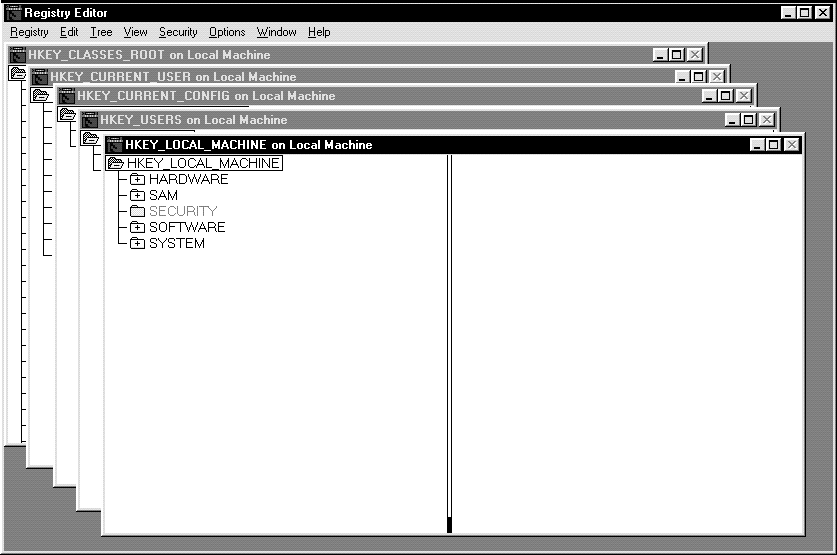
The Registry Editor window appears:
-
Navigate to the values you want to view or modify
by double-clicking keys.
The left-hand side of the window shows the hierarchy of
registry keys, and the right-hand side of the window shows various values
associated with a key.
-
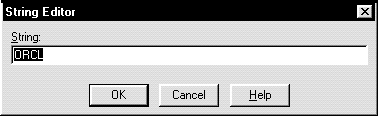
Double-click the parameter to edit.
An editor dialog box appears:
-
Make any necessary edits.
-
Click OK.
-
Choose Exit from the registry menu.
Adding
a Registry Parameter
To add a parameter to the registry:
-
Start the registry in either of two ways:
-
From the MS-DOS command prompt, enter:
C:\> REGEDT32
-
Choose Start > Run, enter REGEDT32 in the Open field,
and click OK.
The Registry Editor window appears.
-
Navigate to the key where you want to add the new
value.
-
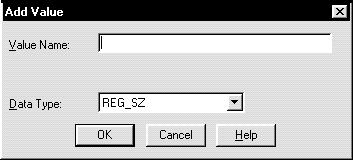
Choose the Add Value option in the Edit menu.
The Add Value dialog box appears:
-
In the Value Name field, enter the name that you
want to assign to the currently selected key.
-
In the Data Type box, select the value class that
you want to assign to the added value:
-
REG_SZ, REG_EXPAND_SZ (for an expandable string),
or REG_MULTI_SZ (for multiple strings) for a data string
-
binary value with a REG_DWORD prefix to identify
a value entry as a DWORD (hexadecimal data) entry
-
Click OK.
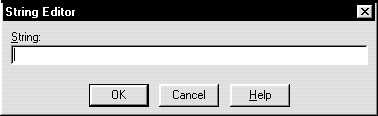
An editor dialog box appropriate for the data type appears:
-
Enter the value itself for the parameter.
The Registry Editor adds the parameter.
-
Choose Exit from the Registry menu.
The registry exits.


