
When any of the UPSs go on battery power, there will be an indicator on the lower left part of the screen, which will display the battery minutes remaining for each UPS.
Also, there will be visual alarms when the UPSs go on battery power, and when there are only 15 and 10 minutes of battery power left.
At any time, the status of the UPSs can be checked from the portal. The window should look like this, under normal conditions:
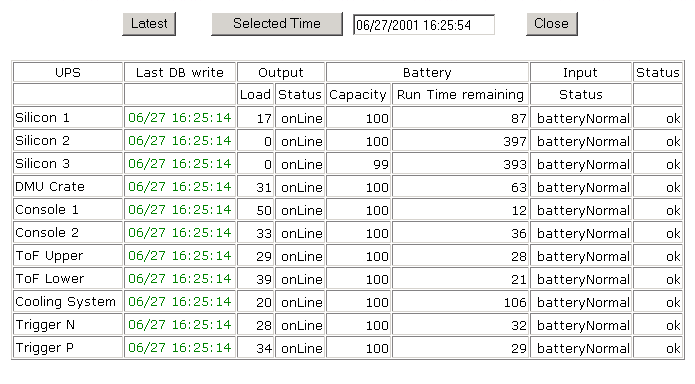
Check the following parameters
| UPS01 | Neg and Pos Ring FEC power supplies; all Bias power supplies | 192.168.10.71 |
| UPS02 | Neg Spec Top and Bottom FEC power supplies | 192.168.10.72 |
| UPS03 | Oct/Vtx and Pos Spec FEC power supplies | 192.168.10.73 |
| UPS04 | DMU crate | 192.168.10.74 |
| UPS05 | Console UPS#1 | 192.168.10.75 |
| UPS06 | Console UPS#2 | 192.168.10.76 |
| UPS07 | TOF UPS#1 | 192.168.10.77 |
| UPS08 | TOF UPS#2 | 192.168.10.78 |
| UPS09 | Cooling System | 192.168.10.79 |
| UPS10 | Trigger rack N | 192.168.10.80 |
| UPS11 | Trigger rack P | 192.168.10.81 |