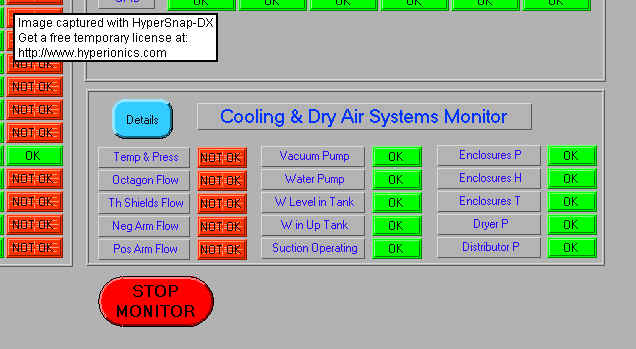
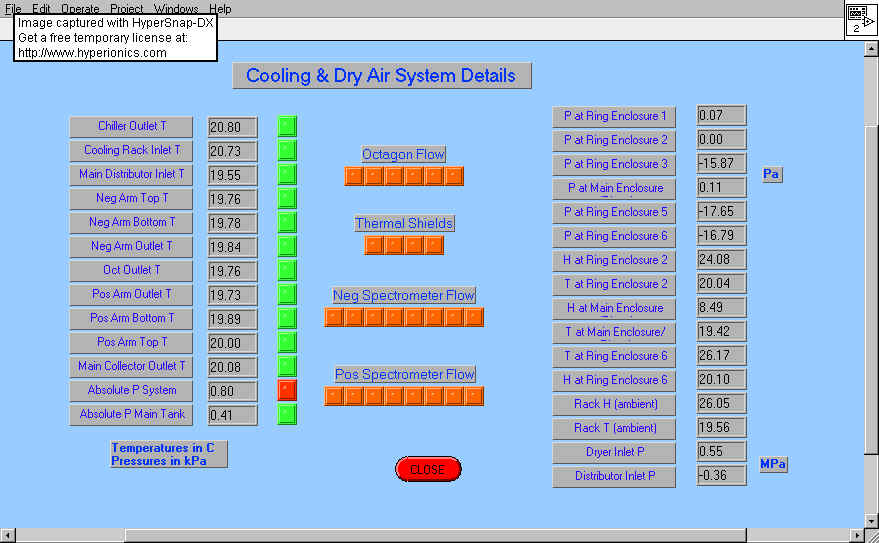
H at Main Enclosure <15%
T at Main Enclosure <21degrees
Dryer Inlet ~0.55 MPa
Distributor Inlet ~0.30 MPa
Last Updated on Friday, March 31, 2000 at 11:55:52. by authors: Carla and Nigel
The portal does automatic checks to see if monitoring is progressing, the first thing is to see that monitoring is running on all working systems, look under "Detector Status"
Currently all except Si hybrid should not say old. If any other
does, check with Carla (for UPS, Si Power Supplies, Si Cooling System), Patrick
(Temperatur and Humidity, Magnet), Edmundo (TOF and Trigger Voltages) to see if expert is
working on system which implies no recording to the database. Also, check that
Magnet Monitor and BLM Monitor did not crash, and if they did, just restart both.
If there is any problem call Nigel/Robert, pager 4424.
Note on Si Hybrid monitoring: If Si Power Supplies to the Oct/Vtx and PSpec are ON(1), DAQ should be updating the information on the Si hybrid monitoring web page. (Bug Andrei/Pradeep if the Si Power supplies to these 2 crates are ON, but the Si hybrid monitoring page says 'Old'). A template for Nominally correct values of the monitored parameters is:
| FEC# | Port# | Module(*) | Graph | Last DB write | Vbc | Ibc | Temp | Shabias | Outbias | Prebias | Vfs | Vfp |
| 1-29 | 0 -3 | Whatever module is connected | 03/15/2000 22:15:01
^ Should be within last hour |
0
< 120V |
0 < 200 mA |
25 < 45 C |
-100 ± 20 |
300 ± 20 |
1200 < 1200 |
650 ± 20 |
-370 ± 20 |
Items marked in Red indicate a severe ALARM, Si expert should be called immediately. Ibc > 200mA indicates problem with the module, Temp > 45C indicates malfunction in the cooling of that particular module
(1) - To determine if the Si Power Supplies to the 'Oct/Vtx' and 'PSpec' FEC crates are ON, go to this portal link, the left-most column identifies the Power supply, an OFF power supply looks like:
| System | Graph | Last DB write | +6V | +3.3V | -3.3V | -6V | Bias | Temp | Fans | Status | ||||||||
| N Spect, Bot | 03/17/2000 18:08:34 | 0.0 | 0.0 | 0.0 | 0.0 | 0.0 | 0.0 | 0.0 | 0.0 | 0 | 0 | 28 | 0 | 0 | 0 | -1 | OK | |
and ON power supply looks like:
| System | Graph | Last DB write | +6V | +3.3V | -3.3V | -6V | Bias | Temp | Fans | Status | ||||||||
| P Spect, Bot | 03/17/2000 18:08:34 | 6.0 | 4.0 | 3.3 | 0.4 | -3.3 | 0.4 | -6.0 | 0.5 | 0 | 0 | 21 | 3240 | 3120 | 3060 | 3120 | OK | |
Checking Trigger Counters HV (including Cosmic Trigger)
Checking Zero Degree Calorimeters.
Write in logbook that you performed check, with any appropriate comments
If one or more of these conditions is incorrect, get hold of Nigel/robert pager 4424,
or call at home or work office. If requires imediate action, turn off the dry air system
see instructions XXXX?
| Time | 14 March Tuesday |
15 March Wednesday |
16 March Thursday |
17 March Friday |
18 March Saturday |
19 March Sunday |
20 March Monday |
21 March Tuesday |
22 March Wednesday |
| 9 am | nigel | andrei | andrei | nigel | andrei | mike | |||
| 1 pm | nigel | carla | carla | carla | carla | robert | |||
| 5 pm | carla | carla | carla | kris | edmundo | robert | |||
| 9 pm | nigel | pradeep | pradeep | kris | pradeep | pradeep |