Last Updated on Wednesday, December 15, 2004 at 10:54:48. by Author: Kris Gulbrandsen
(Expert)
Short Description (longer one will exist later):
We have 10 argon filled bottles sitting around our detector. They are installed to detect large losses of beam that could damage our detector. When a loss occurs, the bottles produce a signal proprtional to the loss which is sent to some amplifiers and then to an ADC. This data is then collected by processes in the Rhic system. After going through a couple of levels of processing in the Rhic system where the data is converted to a dose, it is made available to us via a Cdev Portal Server. The computer in the phobos counting house queries this server for data. It then displays it (in a rather primitive way currently) and also logs the data in the database. Once in the database, web dispalys can be made to view the data.
In addition to the BLMs we have 2 chipmunks in Phobos that detect radiation in basically the same way as the BLMs except that they integrate the charge accumulated by radiation and give out logic pulses, the number of which is proportional to the amount of radiation traversing the gas tube. This allows for a better determination of actual dose taken by a detector. The values of this detector are also written to the database and displayed on the web.
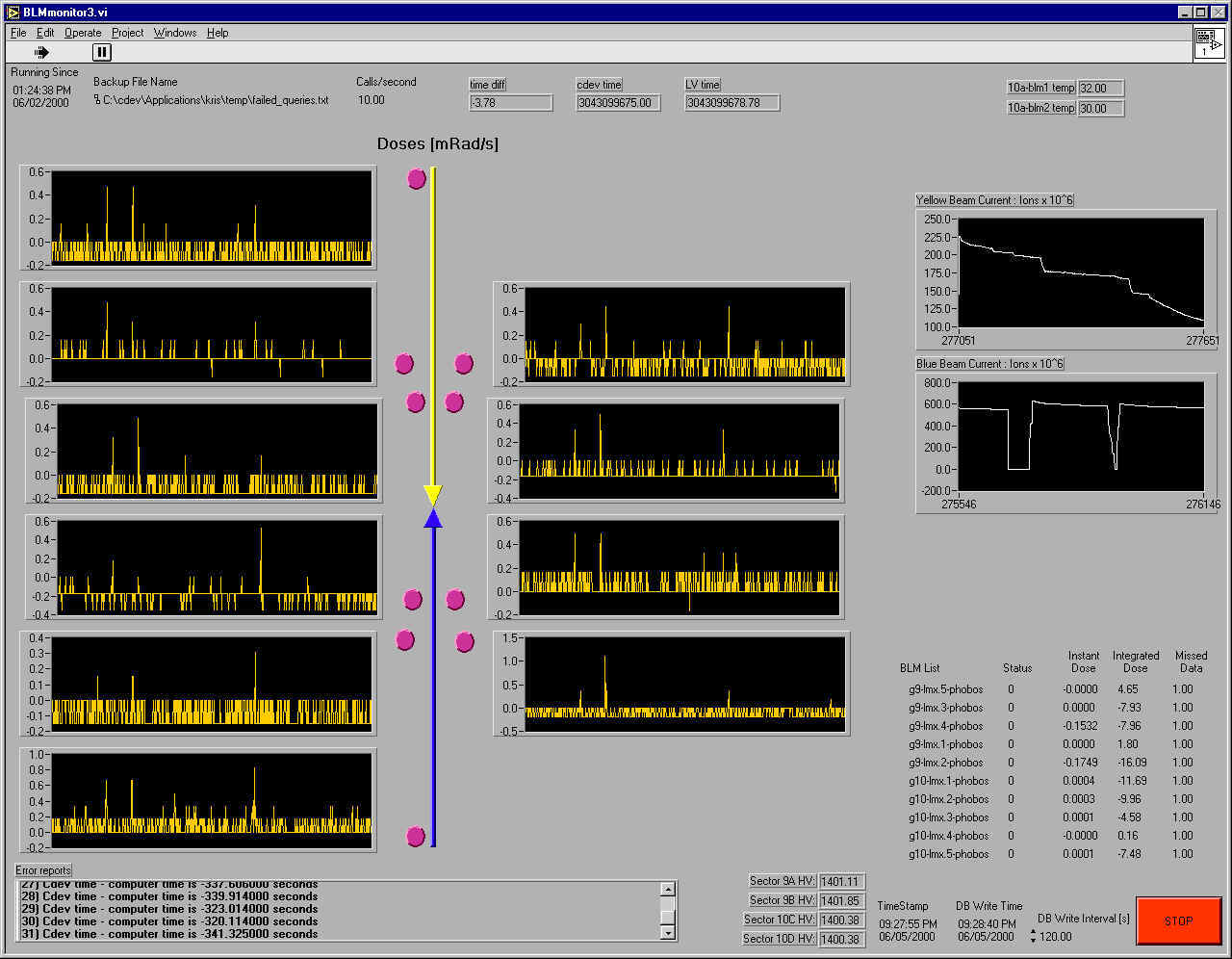
The radiation monitoring display:
Points to note about the display:
Dose Levels:
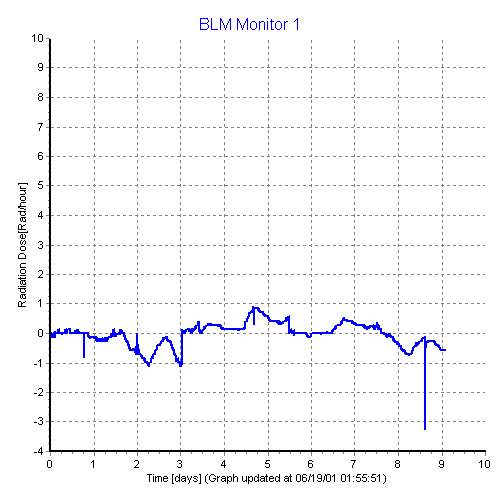
The BLMs are normally very quiet (only showing pedestal). It takes a very high dose to make a signal in the blms. 3.6 rad/hr = 1 mrad/s. If you see a dose of 1 mrad/s above the pedestal (the value that most previous counts sit at), then you should call MCR and ask what they are doing to have this occur (if anything) and note the incident in the logbook.
The radiation monitoring display:
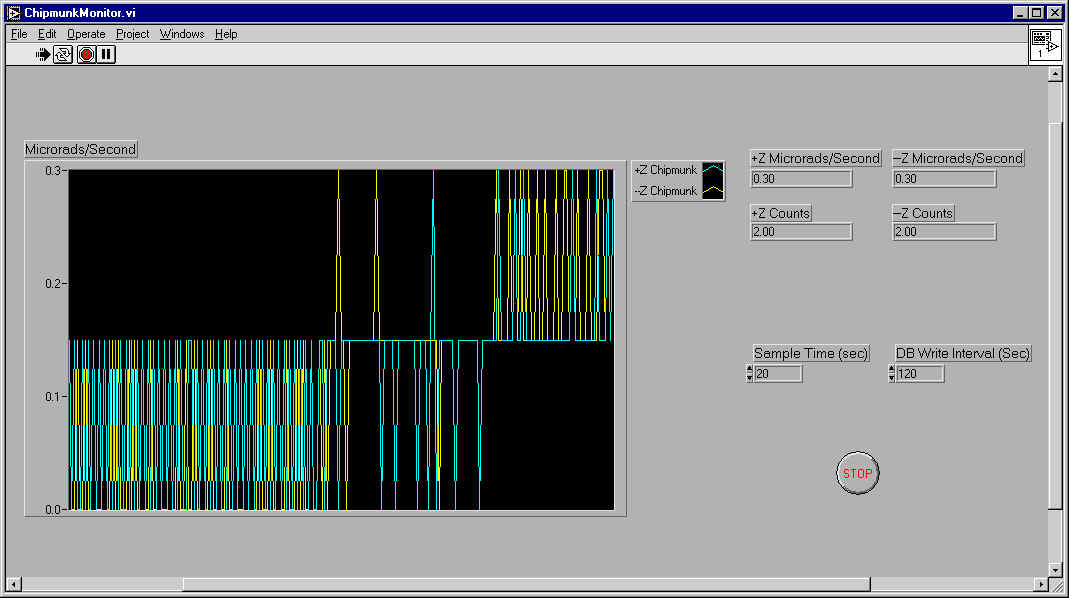
Points to note about the display:
Dose Levels:
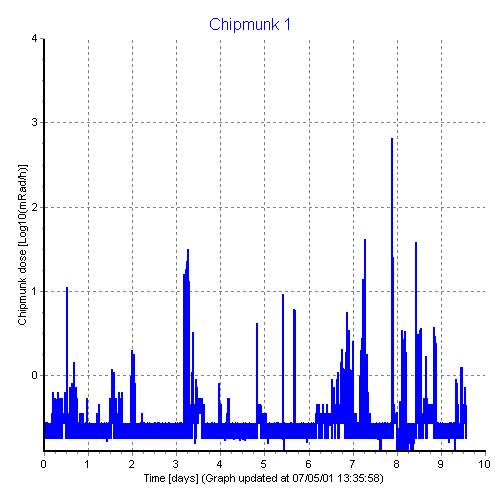
The chipmunks are very sensitive but also have low noise. A dose above 1000 microrad/s is currently considered high (although this number needs to be studied more). If this occurs on the chipmunk monitor, then there is fairly high activity with the beam. If it happens call MCR and ask what they are doing to have this occur (if anything) and note the incident in the logbook.
If this occurs proceed with step 5 of the checklist instructions below, but only for the BLM display. If however, you complete step 5 succesfully (i.e. without having to go on to step 6) and the alarm is still going off then you should pause the alarm and click info (so that it shuts up) and call the expert.
Go to the web portal and click on 'beam loss monitors' on the left under 'detector status'. A pop up window should have a column listing spikes. If there is 0 in every column for the upper table, then there are no spikes.
In the same pop up window as the previous step there is a column in the top table that says 'Dose'. Click on each number and get a small pop up window that show the history for today and the previous day. A sample display (of more than 2 days) is shown below. There are no spuriously high doses in the example. The base level is the slowly moving level in certain sections of the graph. The base level drifts due to temperature (rising and falling peaks over a day usually). There are occasionally some abrupt changes due to a reset of the base pedestal by MCR as shown in the transition from the end of day 2 to the start of day 3. There are also some negative drops that occur for unknown reasons as shown on day 8. You are looking for spikes 3.6 rad/hr above a pseudoflat region of this base level in blms. The chipmunks shouldn't have any pedestal shifts like the blms. Look for doses above 3.6 rad/hr (3600 mrad/hr - scale in log10(mrad/hr) for the chipmunks).
Go to the web and check the nominal status of the BLM system. You can get there from the portal or from this link. If the entry for BLM says off then you don't need to do anything else. If it says on, you must proceed to step 4.
This is an easy step. Just go to the monitor with a label on top saying 'Radiation Monitor'. If you don't see a display taking up the whole window which has charts on the left, some text and a stop button in the lower right corner, then atleast the BLM program isn't open. If it is open, go on to step 5; Otherwise, double click on the icon on the left side of the display labeled BLMmonitor. The program should open and take up the whole window. There should also be a smaller display for the Chipmunk monitor. If a smaller window with a graph isn't evident, look at the toolbar on the bottom of the monitor that says 'Chipmunk Monitor'. If it exists, click it and the display should show up. If it isn't there, double click on the icon on the left side of the display labeled Chipmunkmonitor. This display takes over a minute to open. Then click on the white arrow in the far upper left corner to of whichever you opened to start the program. The arrow turns black when the program is running. Now go on to step 5.
The program should now be open and running. This step is suppose to check that the program is running properly. If the program is collecting data properly (at once per second for the BLM display and once per every 'Sample Time (Sec)' for the Chipmunk display). A chart should be scrolling slowing along the screen and atleast some of the text in the lower left corner of the BLM display and the upper right corner of the chipmunk display should be updating. Specifically, look at the column labeled 'Instant Dose' on the BLM display. Every second or so these values should update. It is possible (if there is little radiation in the tunnel that these values will appear to remain constant for longer periods of time. There is a piece of data labeled 'timestamp' to the right of the columns of data that instant dose is in. This timestamp should be updating every second. If it is, then the program is running properly. For the chipmunk display, the +Z and -Z dose rate and counts should change every 'Sample Time (Sec)' or some small multiple of it (in case the exact same amount of radiation was accumulated in multiple successive intervals). If all of this is working, you are done. If it is not, one program is working improperly and you must go onto to step 6.
- BLM Display: The program is not working. If (in step 4) you did actually open the program then you can proceed to step 7. If you did not do this in step 4, then press the stop button in the lower right corner of the display (wait for it to react to this click - which can happen immediately or take up to 10 seconds) and wait for the program to stop. You know when it has stopped when the arrow in the upper left corner has turned from its black color when it is running to its white color when it is not. Then go to the file menu in the upper left and choose exit from the dropdown menu. Then proceed with step 4 again as if the display was not open.
- Chipmunk Display: For this program simply press the white arrow in the upper left. and it should start. If there are problems then you must call the expert.
Before asking the expert to come in and deal with the problem (which we want to avoid!), try to see if the necessary processes are running within Rhic. Call MCR (x4662) and ask if the BLM manager and the Cdev Portal Server for Phobos are running. All control room operators should know what the BLM manager is and, if not, their shift leader should know. It is possible that some of them don't know what the Cdev Portal Server for Phobos is. If they don't, either have them ask their shift leader or tell them that it is a system server and see if they can figure it out. If they cannot, I suppose you must call the expert.
If they did figure it out and one of the programs was not running, ask them if it can be started. If not, note this in the logbook, send an email to the expert and you are done with the check for this subsystem. If they did start the program then go on to step 8.
If the programs were running, then ask them to restart the Cdev Portal Server for Phobos. They are suppose to honor this request but occasionally they like to have some expert of theirs do this. Then have them do this and call back when the server has been restarted. When you have been told that the server has been restarted go on to step 8.
Close the program as described earlier (stop it and exit -> you will have to exit the chipmunk monitor program and restart it again). Start the programs up again. If the BLM monitor still does not work (timestamp not updating and chart is not scrolling), then call the expert. If it does work, then pat yourself on the back for getting this far and proceed with the next subsystem check.
Please send all comments and suggestions regarding this page to Don Barton. |